Overview of Chemistry Course Placement and ALEKS Chemistry
Chemistry course placement allows you to bypass the chemistry prerequisites for both CHEM-C102 and CHEM-C105. Registration for this placement is free and gives you access to ALEKS Chemistry, which hosts the Assessment. After registering you are presented with an Initial Knowledge Check (for practice) which covers about 130 fundamental chemistry topics with questions that adapt to the knowledge and ability of each student. This is for practice only. If you score 51% or higher on the Initial Knowledge Check then you should be able to pass the Assessment. If you score less, then you may still take the Assessment, but may need to prepare first on your own or using the ALEKS system.
An Assessment is offered approximately once every two weeks subject to the end of your subscription (about 18 weeks) during which you may continue within ALEKS Chemistry to review, practice, and learn material from the topics covered on the exam. As you review, practice, and learn chemistry in ALEKS Chemistry, the system reports how many topics you have learned and mastered. Successful practice leads to topics learned. Periodic partial Knowledge Checks may be automatically offered after a sufficient number of topics have been learned and cover only those topics recently learned; success promotes those recent topics from a learned status to mastered status. None of this progress is official; these checks are only for you to gauge your ability to pass an upcoming Assessment. An Assessment is very much like the Initial Knowledge Check.
Academic Integrity
The purpose of the Assessment is to give an accurate measure of your current skills. Therefore, while you take the Assessment, it is important that you do not consult with any other source for help (friends, family, internet searches, textbooks, etc.). Use of outside resources may result in you being placed into a course for which you are not prepared and waste your time and tuition – and leave you frustrated.
Registration
You will need your IU username and student identification number to identify you as an IU student during this process. For help during this registration process, please contact ALEKS Customer Support by visiting ALEKS Support
- Go to ALEKS.com and click Sign Up Now.
- Enter the ten-digit course code GVJNE-MP46T and click Continue to be taken the ALEKS registration process.
- Before confirming the “class”, please verify the following information:
- Class = Chemistry Course Placement
- Instructor = Matt Marmorino
- Institute = IU South Bend
- You will then be asked whether you have used ALEKS Chemistry before. Most students will select NO, even if you have used ALEKS for the Mathematics Placement Exam. If you are unsure, please select NO, and you will be asked to complete registration by providing the following information:
- Full name
- email address – Use your IU email account
- Student ID – Use your IU student number
- Be sure to record the ALEKS USERNAME and ALEKS PASSWORD you choose so you can re-enter the ALEKS platform. They do not need to be the same as your IU username and password.
- Registration is now complete. You may log off and return to ALEKS Chemistry at a later or continue right now in ALEKS Chemistry starting at step (2) in the next section.
Taking the Assessment
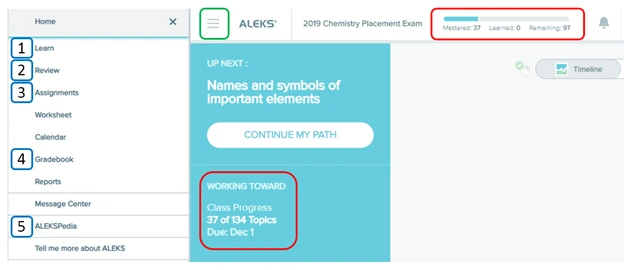
Click on the menu icon (≡) at the top left of the screen to reveal a menu. Your screen should now look mostly like the image below except that colored boxes have been added here to highlight certain sections. The small green box is the menu button which shows/hides the vertical menu on the left of the screen.
- Assignments:
This is where you access your Assessments. You have multiple opportunities for an Assessment. At the end of each Assessment you will be presented with a percentage score: 51% or higher means you have passed. It may take a few days to a week for your passing score to be entered into the IU system.
Assessments are taken with a locked browser managed by Respondus LockDown Browser which must be available on your computer. The link below will let you check whether your computer has this software and link you to the download if needed.
https://www.aleks.com/support/lockdown_system_requirements
- Gradebook:
This is where you can double check your Assessment grades. Unfortunately, the scores are recorded differently here. Your goal is a passing raw score of 51% or higher on an Assessment. That would be recorded in the gradebook as a grade of 100%. Any grade less than 100% indicates a non-passing Assessment raw score of less than 51%. Sorry about the inconsistency between raw score and grade
Using ALEKS Chemistry to Learn and Study
You may use ALEKS Chemistry to learn and review topics to prepare for an Assessment (or just for the sake of learning). Click on the menu icon (≡) at the top left of the screen to reveal a menu. Your screen should now look mostly like the image shown except that colored boxes have been added here to highlight certain sections. The small green box is the menu button which shows/hides the vertical menu on the left of the screen.
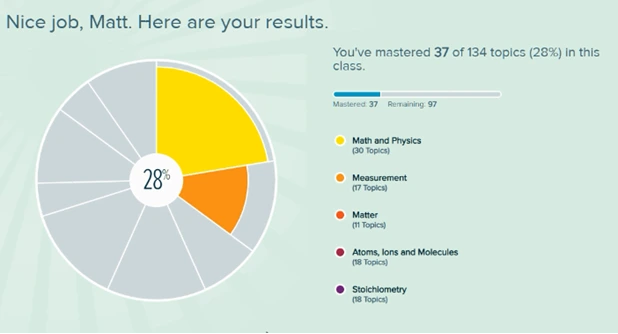
The two items highlighted in red boxes show the same information: a record of your learning progress. Immediately after the Initial Knowledge Check this data shows that the student scored a 28% (mastered 37 of 134 topics). The student would not currently be able to pass an Assessment and should take an Assessment only after reviewing and learning more material. As you learn and practice within the ALEKS system, the number of mastered, learned, and remaining topics in the top-right red box will change, as will your Class Progress in the other red box. These numbers are NOT official once they change from their starting values. However they do serve as an indicator of your knowledge and skill. Once you have mastered 68+ topics (shown in the top-right red box or under Class Progress in the bottom-left red box), then you are ready for an Assessment.
Please note that the due date under “Class Progress” in the lower-left red box is meaningless; unfortunately, it cannot be removed from the ALEKS Chemistry website.
The numbered parts of the menu in the screen image are discussed below.
- Learn: This is where you learn and practice topics that you have not yet “mastered”. There is lots of textbook-like information available here if you get stuck on a question or wish to study material.
- Review: You can review mastered topics here.
- Assignments: Please see the previous section for a description.
- Gradebook: Please see the previous section for a description.
- ALEKSPedia: This is like a chemistry encyclopedia.